Configuration files are used for customising the HTK working environment. They consist of a list of parameter-values pairs along with an optional prefix which limits the scope of the parameter to a specific module or tool.
The name of a configuration file can be specified explicitly on the command line using the -C command. For example, when executing
HERest ... -C myconfig s1 s2 s3 s4 ...
The operation of HEREST will depend on the parameter settings
in the file myconfig.
When an explicit configuration file is specified, only those parameters mentioned in that file are actually changed and all other parameters retain their default values. These defaults are built-in. However, user-defined defaults can be set by assigning the name of a default configuration file to the environment variable HCONFIG. Thus, for example, using the UNIX C Shell, writing
    setenv HCONFIG myconfig
    HERest ... s1 s2 s3 s4 ...
would have an identical effect to the preceding example. However, in this
case, a further refinement of the configuration values is possible since
the opportunity to specify an explicit configuration file on the command
line remains. For example, in
    setenv HCONFIG myconfig
    HERest ... -C xconfig  s1 s2 s3 s4 ...
the parameter values in xconfig will over-ride those in
myconfig which in turn will over-ride the built-in defaults.
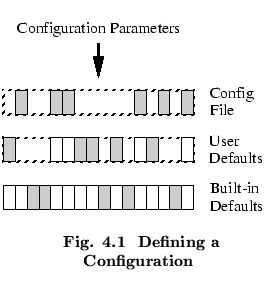
In practice, most HTK users will set general-purpose
default configuration values using HCONFIG and will then over-ride
these as required for specific tasks using the -C command line option.
This is illustrated in Fig. ![[*]](file:/usr/share/latex2html/icons/crossref.png) where the darkened rectangles
indicate active parameter definitions.
Viewed from above,
all of the remaining parameter definitions can be seen to be masked by
higher level over-rides.
where the darkened rectangles
indicate active parameter definitions.
Viewed from above,
all of the remaining parameter definitions can be seen to be masked by
higher level over-rides.
The configuration file itself consists of a sequence of parameter definitions of the form
[MODULE:] PARAMETER = VALUE
One parameter definition is written per line and square brackets
indicate that the module name is
optional. Parameter definitions are not case sensitive
but by convention they are written in upper case. A # character
indicates that the rest of the line is a comment.
As an example, the following is a simple configuration file
    # Example config file
            TARGETKIND = MFCC
            NUMCHANS   = 20
            WINDOWSIZE = 250000.0    # ie 25 msecs
            PREEMCOEF = 0.97
            ENORMALISE = T
    HSHELL: TRACE = 02               # octal
    HPARM:  TRACE = 0101
The first five lines contain no module name and hence they apply
globally, that is, any library module or tool which is interested
in the configuration parameter NUMCHANS will read the given
parameter value. In practice, this is not a problem with library modules
since nearly all configuration parameters have unique
names. The final two lines show the same parameter name being given
different values within different modules. This is an example of
a parameter which every module responds to and hence does not have a unique
name.
This example also shows each of the four possible types of value that can appear in a configuration file: string, integer, float and Boolean. The configuration parameter TARGETKIND requires a string value specifying the name of a speech parameter kind. Strings not starting with a letter should be enclosed in double quotes. NUMCHANS requires an integer value specifying the number of filter-bank channels to use in the analysis. WINDOWSIZE actually requires a floating-point value specifying the window size in units of 100ns. However, an integer can always be given wherever a float is required. PREEMCOEF also requires a floating-point value specifying the pre-emphasis coefficient to be used. Finally, ENORMALISE is a Boolean parameter which determines whether or not energy normalisation is to be performed, its value must be T, TRUE or F, FALSE. Notice also that, as in command line options, integer values can use the C conventions for writing in non-decimal bases. Thus, the trace value of 0101 is equal to decimal 65. This is particularly useful in this case because trace values are typically interpreted as bit-strings by HTK modules and tools.
If the name of a configuration variable is mis-typed, there will be no warning and the variable will simply be ignored. To help guard against this, the standard option -D can be used. This displays all of the configuration variables before and after the tool runs. In the latter case, all configuration variables which are still unread are marked by a hash character. The initial display allows the configuration values to be checked before potentially wasting a large amount of cpu time through incorrectly set parameters. The final display shows which configuration variables were actually used during the execution of the tool. The form of the output is shown by the following example
    HTK Configuration Parameters[3]
      Module/Tool     Parameter                  Value
    #                 SAVEBINARY                  TRUE
      HPARM           TARGETRATE         256000.000000
                      TARGETKIND                MFCC_0
Here three configuration parameters have been set but the hash
(#) indicates that SAVEBINARY has not been used.