Broken Links
>> Back to Quality Assurance
Check broken links on WordPress Dashboard
- Log into your site
- Go to Tools -> Broken Links
- Check each error. If the status is 404, open the source, look for the link text, and replace the URL with a correct one or remove the link.
- URL: Link that is broken
- Status: Error code (Reference: Please see HTTP Status)
- Link Text: Look for this text on the page
- Source: Page that has the broken link
Check broken links on Siteimprove
- Log into Siteimprove (Reference: Basic Usage)
- Expand Quality Assurance
- Expand Links and click "Pages with Broken Links"
- Title/URL: Page that has the broken link
- Broken links: Number of broken link(s)
- Page level: The lower the number is, the higher the priority is.
- Check each error.
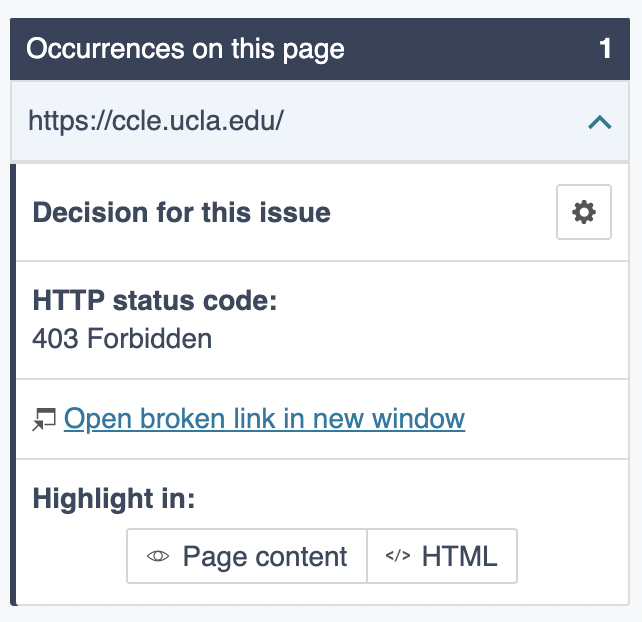
- Check HTTP status code
- Click "OPen broken link in new window" and see if the link is really broken
- Fix or dismiss the error
- Fix: You need to log into WordPress and update the page. After fixing it, go back to Siteimprove and click the Recheck button. Or wait for the next scan (which may happen in the next 5 days).
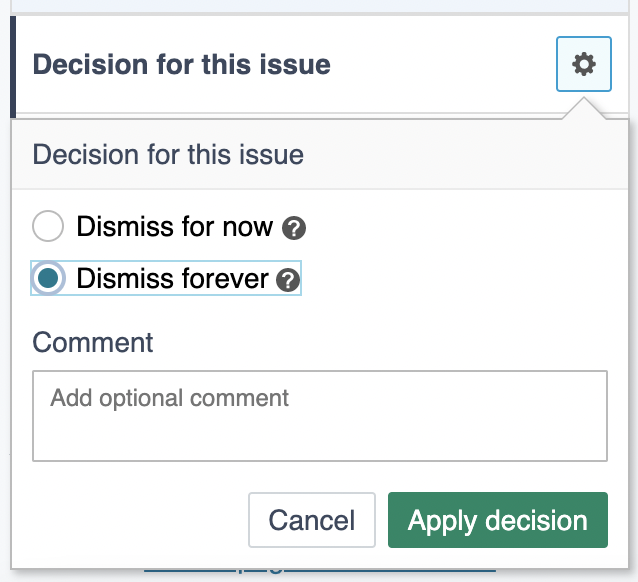
- Dismiss: Some URLs (like ccle.ucla.edu) can be accessible only via VPN. If that's the case, click the gear icon, select "Dismiss forever," and click "Apply decision"
HTTP Status
- 100’s status codes are informational codes that let clients know that so far everything is going according to plan.
- 200’s status codes are success codes that indicate that the request was received, understood, accepted and processed successfully by the client.
- 300’s status codes are redirection codes that simply show that the requested content has been temporarily moved to another URL.
- 400’s status codes are client errors that signal that something’s wrong with the request.
- 403 Forbidden: Some URLs require VPN. If the URL is accessible with VPN, dismiss the warning.
- 404 Not Found: The page doesn't exist. Fix the error by replacing with a correct link or removing it.
- 410 Gone: The website is no longer available on the server. Fix the error by replacing with a correct link or removing it.
- 500’s status codes are server errors that specify that the server found the requested web page, but can’t grant access to it.
- 503 Service Unavailable: If the error is not temporary, remove the link.
Updated